August 21, 2026
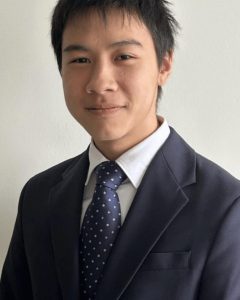 When Jim Huang Chen began his internship with the FreeBSD Foundation, he was only finishing his first year as a Software Engineering student at the University of Waterloo. A few months later, he had spent the summer working inside the FreeBSD codebase, contributing to Raspberry Pi support, learning from longtime developers, and gaining a much deeper understanding of how an operating system works.
For Jim, that process of learning became one of the most valuable parts of the experience.
From a Graphing Calculator to Systems Programming
Jim’s interest in programming started well before university.
Around seventh grade, he began programming simple games on a TI-84 graphing calculator using TI-BASIC. That eventually led him to the Cemetech community, where he connected with other technology enthusiasts and started exploring lower-level languages, including assembly and C.
Throughout high school, Jim frequently worked with older hardware that he didn’t want to purchase Windows licenses for. Linux became the natural alternative, introducing him more deeply to open source software and the communities surrounding it.
“Systems programming is about as close as you can get to treating computers as a machine rather than magical software abstractions,” Jim said.
That perspective appealed to his interests in mathematics, computation, and understanding what computers are actually doing beneath the software we interact with every day.
Taking a Chance on FreeBSD
Jim originally expected to pursue Google Summer of Code and didn’t know that the FreeBSD Foundation offered an internship program.
That changed when he came across the opportunity on WaterlooWorks, the University of Waterloo’s job board.
With hundreds of other applicants, he wasn’t particularly confident about his chances. But the work interested him enough to apply anyway.
“I figured I might as well write a cover letter, submit my resume, and pray,” he said. “I’m glad it worked out!”
That application led to a summer focused primarily on two Raspberry Pi projects.
Expanding FreeBSD Support for Raspberry Pi
Jim’s first project involved porting Raspberry Pi Imager to FreeBSD.
Raspberry Pi Imager provides a graphical way for users to prepare a Raspberry Pi, including selecting a device, choosing an operating system image, configuring settings, and writing the image to storage.
Before Jim’s work, the application supported Linux, macOS, and Windows, but not FreeBSD natively.
His task was to add a FreeBSD backend using FreeBSD-specific libraries and functionality. The goal was to make a native version available through the FreeBSD Ports Collection rather than relying on another operating system’s version through a compatibility layer. The resulting changes are currently under review for inclusion upstream.
His second project took him even deeper into hardware: bringing FreeBSD support to the Raspberry Pi Compute Module 5.
That work required adding support for components including the Raspberry Pi 5’s PCIe controller and RP1 southbridge, which manages access to peripherals such as Ethernet and USB.
By the time Jim reflected on the project, he was confident that the PCIe controller was working, while memory allocation for devices connected through the RP1 remained an ongoing challenge.
Learning to Understand the “Why”
For Jim, the biggest reward wasn’t one patch or technical milestone.
It was being able to look back and see how much more he understood.
As a first-year student entering a large operating system codebase, there were inevitably pieces that initially didn’t make sense. Over the course of the internship, reading code, writing code, studying documentation, and asking questions gradually changed that.
He reached a point where he could not only explain what his code was doing, but why it needed to be there.
That growth also changed some of his assumptions about FreeBSD.
Before the internship, Jim viewed FreeBSD largely as an operating system for a relatively stable world of amd64 servers. Working with arm64 showed him how much development is happening underneath FreeBSD’s consistent user-facing experience.
He encountered evolving interrupt and clock frameworks, different approaches to device enumeration, and interfaces that have changed considerably over the Project’s history.
“Just taking time to explore how much is boiling in the code under the always-calm, always-consistent user-accessible surface of the operating system has been pretty amazing,” he said.
Finding the Problem Before Finding the Solution
One of the most important lessons Jim learned was that solving a technical problem often starts with figuring out exactly what the problem is.
For the Raspberry Pi Imager work, FreeBSD’s documentation gave him a strong starting point. Man pages, the FreeBSD Handbook, existing scripts, and other resources helped him gradually understand FreeBSD’s disk architecture.
The Raspberry Pi Compute Module 5 was more difficult.
Because components such as Broadcom’s BCM2712 and Raspberry Pi’s RP1 are relatively new, detailed technical documentation could be difficult to find. Jim supplemented what was available by reading about driver development, studying similar drivers, and asking experienced developers for guidance.
“More often than not, it’s easier to ask someone why something needs to be done than to wizard out the intention from the code they write,” he said.
He also learned to make his development process more efficient.
Early in the internship, rebuilding the FreeBSD kernel locally could take minutes for an incremental build and hours for a clean build. Moving compilation to the Foundation’s build servers reduced those waits significantly.
Jim then automated repetitive steps in his workflow, including building, booting the Raspberry Pi, mounting disks, copying files, and unmounting them.
Those improvements did more than save time. They made experimentation easier and gave him more room to focus on understanding the underlying technical problems.
Meeting the Community Behind the Code
Jim also attended BSDCan and the FreeBSD Developer Summit during his internship.
Initially, the experience was intimidating.
Only about a month into the internship, Jim found himself surrounded by people who had been developing and using FreeBSD for decades. But that feeling changed as he began talking with community members.
“If you have something to talk about, it’s more likely than not that someone will be excited to talk you through it and discuss whatever you had on your mind,” he said.
He attended sessions covering topics ranging from security and capability pointers to static analysis, formal verification, hardware support, and the future of FreeBSD’s scheduler.
What surprised him most was how social the events were. Rather than simply listening to presentations, much of the value came from discussions, questions, feedback, and conversations with other attendees.
“Definitely much more immersive than the 9-5 university-style lectures I anticipated.”
Making Open Source Feel More Accessible
Working directly with the FreeBSD community also changed Jim’s perception of contributing to open source.
From the outside, large projects can sometimes appear intimidating or reserved for highly experienced developers. His experience with FreeBSD was different.
“The people are nice,” he said. “They are willing to give you mentorship and to give some thought to patches you submit.”
The internship also gave him a greater appreciation for the broader open source ecosystem and how much software depends on projects maintained by relatively small groups of contributors.
For Jim, that highlighted both the importance of open source and the need for more people to contribute their time, expertise, and support.
His Advice: Start the Conversation
Jim’s advice for students thinking about contributing to FreeBSD is straightforward: reach out.
“I think that if you’re thinking about getting involved yourself, you should really bite the bullet and email someone involved in the project.”
Using FreeBSD itself can also reveal opportunities to contribute. If something doesn’t work as expected, investigating why could lead to a first bug fix or patch.
For those interested in a particular area, Jim recommends looking through development activity to find the people working on that part of the system and asking where help is needed.
The important part is starting somewhere.
Plenty More to Explore
Jim doesn’t plan for his FreeBSD work to end with the internship.
He hopes to continue improving Raspberry Pi 5 and RP1 support, create ports for software he would like to use on FreeBSD, and investigate issues he has encountered while running FreeBSD on his own hardware.
He is also interested in eventually exploring the FreeBSD network stack, scheduling, and resource management.
As for his career, Jim is still early in his studies and keeping his options open, but systems programming and formal methods are areas he would like to continue exploring.
A Summer of Exploration
Jim credits Ed Maste and Siva Mahadevan for giving him the opportunity and supporting him throughout the internship. He also thanked Bjoern Zeeb, Adrian Chadd, Sheng-Yi Hung, and Minsoo Choo, along with fellow interns Sourojeet Adhikari and Nimish Jain, for their guidance, technical help, and willingness to exchange ideas.
The FreeBSD Foundation would also like to thank Jim for his contributions throughout the semester. We appreciate the curiosity, dedication, and persistence he brought to his work, as well as his willingness to take on new challenges and explore different areas of the FreeBSD Project.
Looking back, Jim describes the internship as challenging at times, but ultimately an opportunity to learn in a way that would be difficult to replicate elsewhere.
He appreciated the flexibility of the work, the emphasis on independent exploration, and the freedom to experiment without being afraid of getting everything right immediately.
“I feel that the time I got to pursue the bits I’m interested in, to try things out without fear of repercussions, and to pore over technical goodies was a valuable experience for my first internship,” he said.
For someone who started programming by experimenting with a graphing calculator, that curiosity remains at the center of Jim’s work.
Only now, the system he’s exploring is a little bigger.